


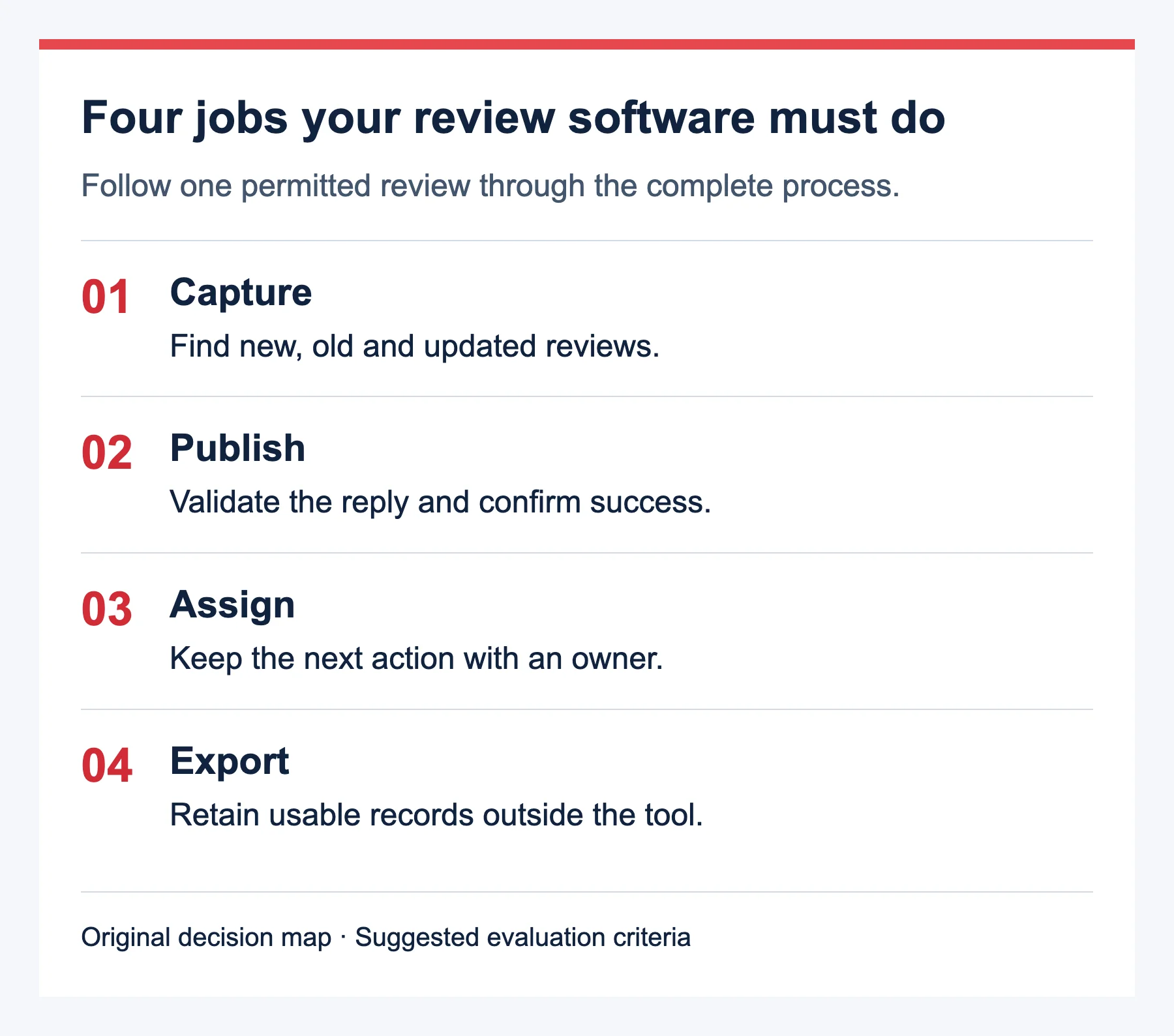
Choose app store review management software by testing whether it captures the feedback you need, publishes accurate replies, and keeps follow-up work attached to an owner. For a team running iOS and Android apps, the essentials are reliable store connections, updated-review handling, permission controls, useful exports, and a price that fits the real workload. AI drafting is useful only when those basics work.
Start with one recent release and the reviews it generated. Bring examples of a bug report, a changed review, a billing question and feedback in another language. Use them to compare the workflow below. This guide concerns customer ratings and written reviews; Apple’s App Review process for approving an app submission is a separate activity.
Which app review management workflow do you need?
List the people who read, answer and investigate feedback. A solo developer may be able to work directly in the two store consoles. A support team may need a shared queue and approval controls. A product analyst may primarily need dependable exports and release-level analysis. Buying the largest feature bundle before separating those jobs can add expense without removing the daily bottleneck.
| Approach | Useful when | Prove before adopting |
|---|---|---|
| Native store consoles | One owner can review both queues and follow up reliably | Time needed to check each store, track outstanding issues and prepare reports |
| Shared review inbox | Several people answer across apps, stores or languages | Assignment, duplicate-reply prevention, approvals and publishing status |
| Helpdesk connection | Support already works in a ticket queue | Whether the connection can publish a reply or only open the store console |
| Review analysis workspace | Product teams need themes across releases | Raw review access, version coverage, reproducible filters and exports |
Write down the complete inventory: app listings on each store, required countries, working languages, team seats and expected written reviews per month. A product available on iOS and Android has two store listings. Ask how the vendor counts apps, sources and seats instead of assuming the labels mean the same thing across plans.
For the daily handoffs that follow a purchase, use the app store response workflow. Keep the procurement exercise focused on whether the software can support that process, including the work after a reply goes public.
Swipe horizontally to view the full figure.
App store review management: platform limits that change the purchase
Store rules determine what a connected tool can retrieve and publish. Ask the vendor to distinguish limitations of the store from limitations of the subscription. A promise of complete history, instant updates or unlimited replies needs a specific explanation of the source, refresh interval and plan allowance.
350
Maximum characters in a Google Play API reply
Google Reply to Reviews API
7 days
Recent created or modified reviews available through the Play list endpoint
Google Reply to Reviews API
100
Maximum reviews per page in the Play list response
Google Reply to Reviews API
The Google Play Reply to Reviews documentation says its API exposes production reviews containing comments. Ratings without written feedback and alpha or beta feedback are outside that API’s review feed. Its list endpoint retrieves reviews created or modified within the last week; older history has a separate CSV download route through Play Console. Ask how an initial import and a prolonged connection outage are recovered.
| Requirement | Apple App Store | Google Play |
|---|---|---|
| Reply history | Apple says you can reply regardless of review age; only the latest version of your response is shown | Recent API retrieval and historical CSV import need separate consideration |
| Changed feedback | A reviewer can update feedback after a response; review-edit alerts are available in App Store Connect | The API orders comments by creation or modification; test that an update reopens the right record |
| Public reply | Keep responses concise, relevant and free of personal information | API replies are limited to 350 characters; test validation before publishing |
| Reporting context | Summary ratings are territory-specific; a reset does not remove written reviews | API version and device fields appear only in some results; retain missing values explicitly |
Apple’s ratings and reviews guidance also explains that resetting a summary rating leaves past written reviews visible. A software migration should preserve that context. A jump in the displayed score is not necessarily a change in the average rating of reviews collected during your chosen month.
Treat the source review ID, store, app identifier, original language and modification time as essential fields. Keep a missing version blank or explicitly unknown. Inferring it from the newest release can make an older bug look like a regression. The comparison of app-store rating measures explains why rating counts and written-review workload need separate denominators.
Eight trial tests before choosing app review management software
Use genuine reviews you are authorized to handle and a vendor demonstration or test workspace for failure cases. You do not need to publish artificial customer reviews to evaluate software. Define an acceptable result before the trial starts, then record what happened and the plan tier used. A polished demonstration is useful, but it should answer the same questions as your own evaluation.
| Test | What to check | Evidence to keep |
|---|---|---|
| 1. Historical import | Find a recent review and an older known review from each required store | Source IDs, covered date range and any import gaps |
| 2. Updated review | An existing review changes its text or rating without becoming a duplicate | One source record with the new modification time and renewed attention |
| 3. Reply validation | A Play draft over 350 characters is blocked or clearly corrected before submission | Visible validation and a final draft within the limit |
| 4. Publishing failure | A simulated failed request stays failed or pending until success is confirmed | Error, retry behavior, final store response and no false completion |
| 5. Ownership collision | Two agents open the same review | Visible owner or conflict warning before a duplicate action |
| 6. Language quality | Review original text beside translation and draft | A qualified speaker checks meaning and the proposed next step |
| 7. Permission removal | Demonstrate removing publishing access in a safe test setup | Publishing stops, and the team sees an actionable connection warning |
| 8. Export and exit | Export a representative sample and open it outside the product | Usable IDs, dates, text, tags, reply status and documented exclusions |
For each store, compare a known sample against the native console. Count missing reviews and duplicates, then investigate the reason. Your sample should span several dates, ratings and languages. A successful check of five recent English comments does not establish historical completeness across every storefront.
Measure arrival time separately from response time. If the tool checks for new feedback every few hours, a fast agent cannot answer a review the inbox has not yet received. Record the review’s store timestamp, first appearance in the tool, approval time and confirmed publishing time. These four timestamps locate the delay without blaming the wrong part of the process.
A notification also needs a precise definition. Google’s API documentation distinguishes a first reply from an edit to an existing reply: merely updating the developer response does not trigger the same notification, while replying after the user updates their review does. The Google Play management guide covers the ongoing response routine.
Evaluate AI replies and analysis against actual review meaning
Give AI drafting a small, varied sample with a written answer key. Include a positive review containing a bug, a sarcastic complaint, a billing problem and a request for an unavailable feature. Check whether the draft invents a refund, promises an unconfirmed release date, changes the customer’s meaning or exposes private information. Record the time spent correcting each draft.
A useful quality measure is the share of drafts ready after light editing, with the sample size visible. If 12 of 20 drafts need only minor wording changes, that is 60% of that test sample. It is not a general accuracy guarantee. Keep serious errors separate from stylistic edits; an incorrect billing promise should not disappear inside an average quality score.
“The ideal response is concise and clearly addresses your customer’s feedback.”
Source: Apple Developer, Ratings, reviews, and responses
Set approval rules around the consequence of a mistake. Routine acknowledgments and unresolved account or security complaints should not share an automatic publishing rule. Require a person to verify the actual fix status and route private account details to the appropriate support channel. Google discourages automated placeholder replies that are intended to be manually updated later.
For sentiment analysis, compare the tool’s labels with what a human reads in the same comments. Ask whether you can correct tags and inspect the original evidence behind a summary. A label such as “negative” does not tell an engineer whether checkout failed, a fee was unclear or the customer wanted an unsupported payment method. The sentiment analysis workflow offers a practical way to review these categories.
Calculate app review management software cost from the workload
Request a quote using one shared workload sheet. Include the subscription, extra sources, seats, translation or AI allowances, export access and onboarding. Check whether the trial enables a higher tier than the one you intend to purchase. An integration badge alone does not establish that publishing, exports and approval controls are included in your chosen plan.
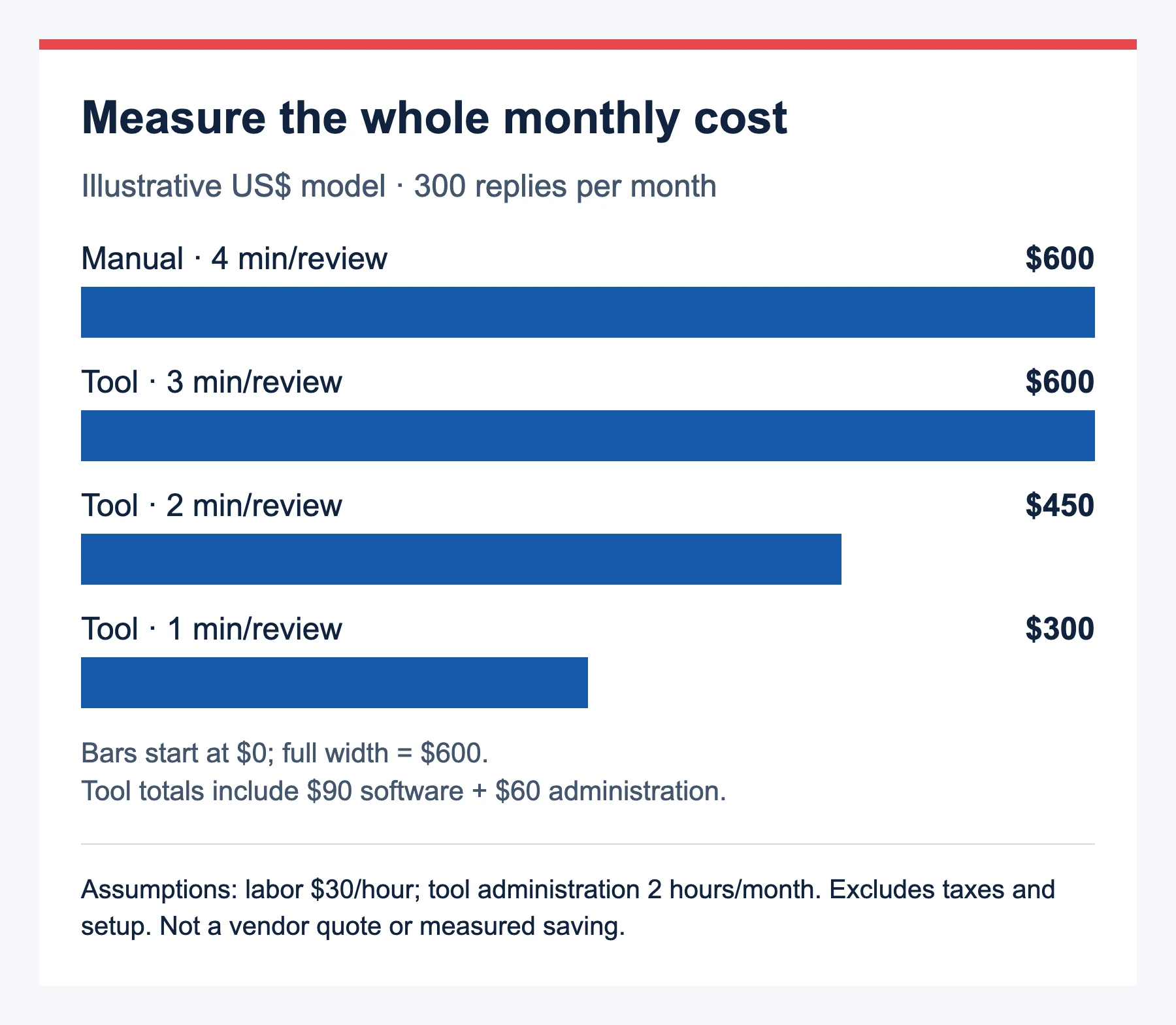
Then add labor. The following is an illustrative planning calculation in US dollars, not a vendor price or promised saving. Assume 300 reviews per month need a response, manual handling takes 4 minutes each, and staff time costs $30 per hour. Manual response labor is 20 hours, or $600 per month. A hypothetical tool costs $90 per month and requires 2 hours of monthly administration.
| Scenario | Reply labor | Administration + subscription | Monthly total |
|---|---|---|---|
| Manual baseline: 4 min/review | 20 h × $30 = $600 | $0 in this simplified example | $600 |
| Tool: 3 min/review | 15 h × $30 = $450 | $60 + $90 | $600 |
| Tool: 2 min/review | 10 h × $30 = $300 | $60 + $90 | $450 |
| Tool: 1 min/review | 5 h × $30 = $150 | $60 + $90 | $300 |
Swipe horizontally to view the full figure.
In this example the tool must save at least 1 minute per review to offset its $150 monthly subscription-plus-administration cost: $150 ÷ ($30/hour ÷ 60) = 300 minutes; 300 minutes ÷ 300 reviews = 1 minute. Time spent checking drafts, fixing failed publications and correcting tags belongs in the measured handling time. Do not count generated drafts as completed responses.
Repeat the calculation for a quiet month and a release spike. If the subscription rises at a usage threshold, include that step change. If a trial saves staff time, it creates capacity; cash payroll savings occur only when staffing expense actually changes. Avoid justifying a purchase with assumed rating increases or future installs that you have not measured.
Make reporting useful to support and product teams
Ask the software to answer a concrete release question: which reviews mention a new login problem, which app versions are known, who owns the investigation, and what changed after the fix? You should be able to move from a summary to the underlying comments. Keep the count of analyzed written reviews beside every percentage.
For example, 12 login complaints among 60 written reviews means 20% of that review sample mentions login. It does not mean 20% of all customers have the problem. Pair review evidence with support tickets and product telemetry before estimating impact. Preserve the date range and filters when exporting a report so another person can reproduce it.
- Coverage: imported written reviews compared with the known source sample, including missing and duplicate records.
- Publishing: confirmed replies, failed replies and items still waiting for approval.
- Responsiveness: arrival delay and response delay, with working-hour assumptions stated.
- Follow-up: unresolved issues by owner, with evidence of the eventual product or service action.
- Quality: checked replies, substantial corrections and serious errors, each with a sample count.
A falling star rating may justify investigation, but it cannot establish the cause on its own. Separate stores, territories and release context before interpreting movement. Use the rating-drop investigation steps to connect review signals with a verified operational response.
Make the final choice with evidence from the trial
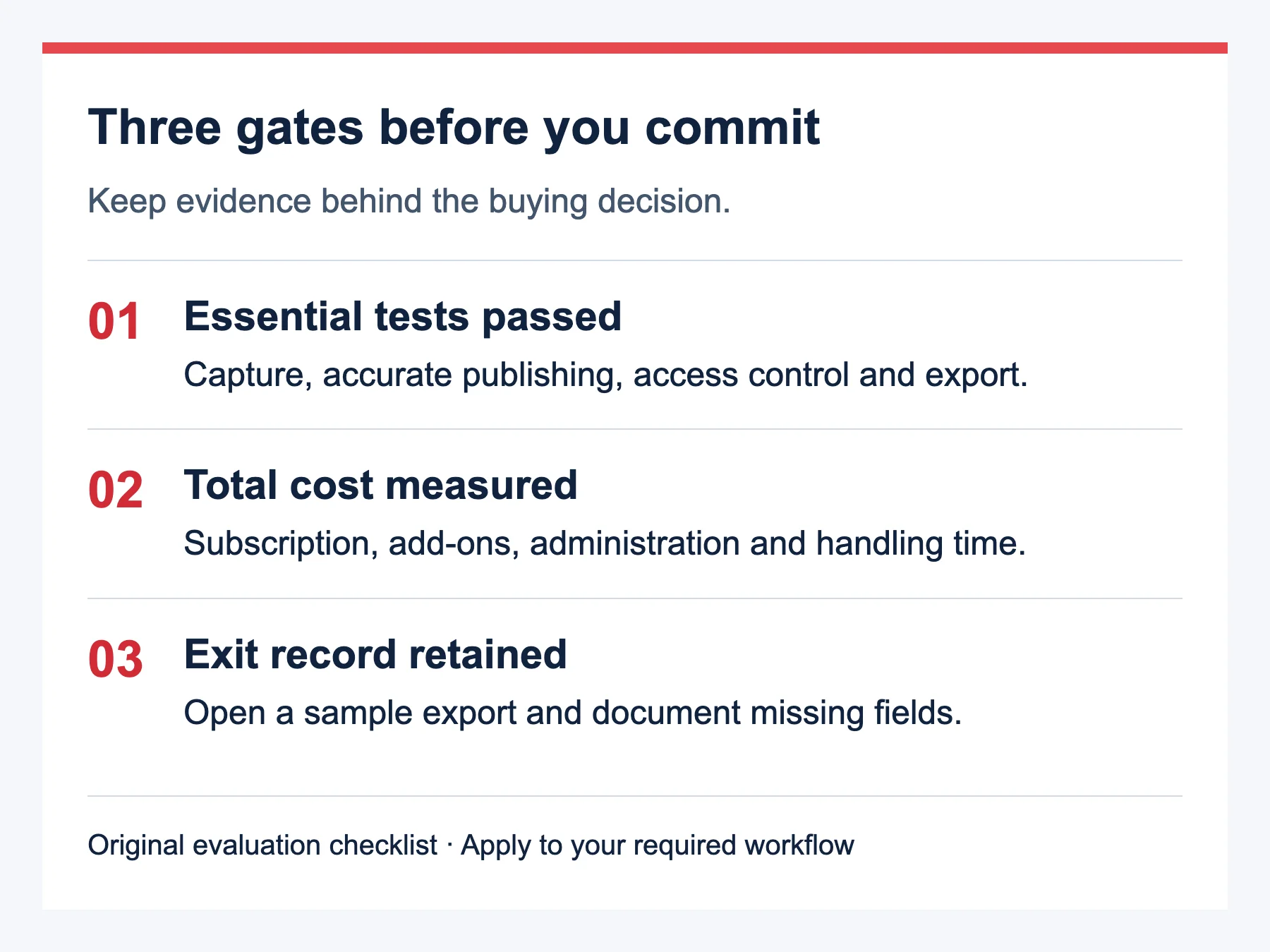
Mark capture, publishing accuracy, access control and data export as essential requirements if your workflow depends on them. A high overall score should not conceal a failure on one of those essentials. For optional capabilities, record the benefit, extra cost and who will actually use the feature each week.
Swipe horizontally to view the full figure.
Start the rollout with one app and named owners. Keep the native consoles available as a reference while the team checks the new queue. Document the refresh interval, approval rules, connection owner and steps to recover an interrupted import. Expand when the team can account for incoming reviews and published replies without reconstructing the story in a separate spreadsheet.
Finally, save the quote, trial results, required plan features and a representative export together. Review them after the first billing period. The best fit is the setup that consistently captures the right feedback, supports accurate responses and makes the next action clear at a cost your team can sustain.
Frequently asked questions
- What is app store review management software?
- It helps teams collect, organize, analyze and respond to written app-store reviews. Features may include a shared inbox, assignments, translations, AI drafts and reporting. Confirm the exact store coverage and whether replies publish inside the tool or open the native console.
- Do I need paid software if I already use the store consoles?
- Not necessarily. Native consoles can work when one owner can reliably review feedback and track follow-up. Evaluate a paid tool when coordination, multiple apps, languages or reporting create measurable work that the tool can reduce.
- Can a Google Play integration import every historical review automatically?
- Do not assume it. Google’s Reply to Reviews list endpoint returns reviews created or modified within the last week. The documentation points to a Play Console CSV download for older history. Ask how the vendor imports that history and recovers gaps.
- Can AI safely publish every app review response?
- Every draft still needs controls appropriate to its consequences. Test factual accuracy, translation, privacy and unsupported promises. Keep human approval for unresolved account, billing or security issues and verify that publishing succeeded.
- How should I compare software prices?
- Use the same counts of apps, stores, seats, reviews, replies and translations. Include export access, onboarding and administration. Measure total handling time during the trial instead of assuming that every generated draft saves labor.
More from the Blog
App store statistics: Apple and Google Play ratings compared
November 25, 2026
App Store Review Response Workflow: Apple and Google Play Playbook for Fast, High-Quality Replies
March 14, 2026
App Store Rating Drop Recovery Playbook: 30-Day Plan for Apple App Store and Google Play
March 14, 2026