

Can I check the AI replies before they post?
Yes. Approve each reply yourself, or set rules: post five-star replies on their own and hold anything below three stars for a manager.
By industry
From the blog
Learn


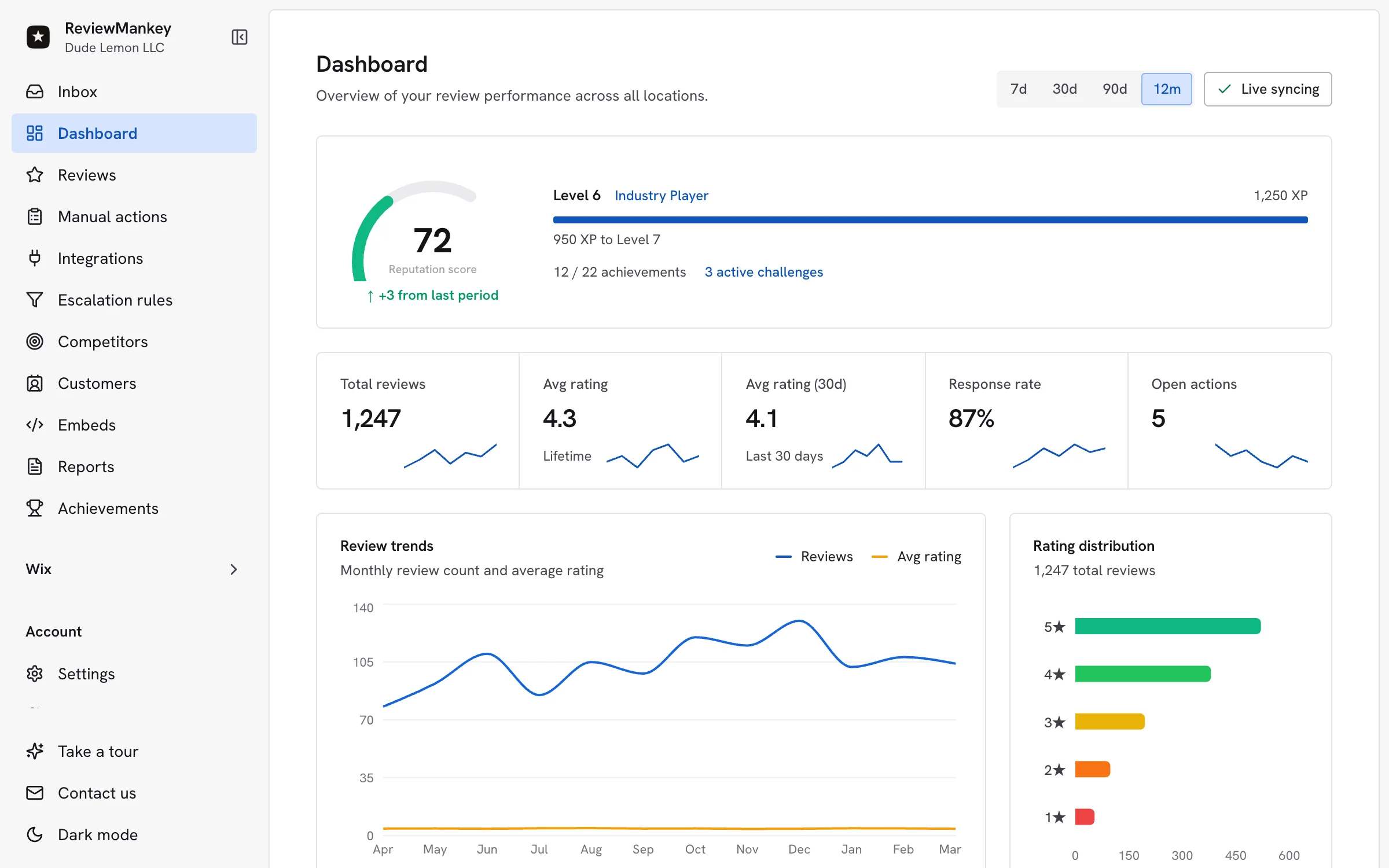
Reviews come in from Google and the app stores. ReviewMankey replies to every one in your voice, flags the bad ones to the right person before they hurt, and brings in more good ones.
Approved on 4.3
 Product Hunt
 G2
 Capterra
 SaaSHub
The problem
Reviews arrive on Google and the app stores every day. Most wait days for a reply, and a one-star review is read by every customer before anyone at the business sees it.
Without ReviewMankey
Lovely staff and great coffeeNo reply after 3 weeks
Waited 45 minutes for my orderSeen 9 days later
The app crashes when I log inNever answered
Love the new updateNever answered
Parking was hard to findReplied 11 days later
Rude staff at the front deskRead by every customer
 With ReviewMankey
Lovely staff and great coffeeReplied in your voice
Waited 45 minutes for my orderFlagged to the manager
The app crashes when I log inSent to the app team
Love the new updateReplied in your voice
Parking was hard to findReplied in your voice
Rude staff at the front deskAn incident opened and assigned
One inbox for every review on Google, Google Play and the App Store.
One inbox for every review on Google Business Profile, Google Play and the Apple App Store. The AI replies in your voice, your rules flag the bad reviews to the right person, and review requests bring in new ones.
Reviews from Google Business Profile, Google Play and the Apple App Store land in one inbox for every location, with the rating, the sentiment and who is handling it.
The AI reads the review, the rating and the location and writes a reply in your tone. Approve each one, or turn on auto-respond and it is posted for you.
Your escalation rules catch one-star reviews and words like refund or unsafe, open an incident and assign it to the right person with a severity.
Capture customers on your site, then send review request emails and drip sequences that ask happy customers to leave a review on Google.
Benchmark your rating, review count and share of reviews against the businesses around you, and see where you rank.
Every reply to a review is read by the customers who come after it, so we built ReviewMankey to make each one sound like you at your best.
ShanChief Solutions Architect
Connect on LinkedIn
The questions we hear most, with the part of ReviewMankey that answers each one.
Yes. Approve each reply yourself, or set rules: post five-star replies on their own and hold anything below three stars for a manager.
Google Business Profile through Google’s own sign-in, Google Play through a service account and the Apple App Store from your app’s listing. Every plan includes all three.
A matching escalation rule opens an incident, assigns it with a severity and alerts the owner, and the AI drafts a reply for a person to approve.
Add the capture pixel to your site to collect customers who agree to be contacted, then send them a review request email and a drip sequence that follows up. Each email links straight to your Google review form, and the console shows who opened, clicked and reviewed.
Pick a listing and ReviewMankey finds the businesses nearest you, then tracks your rating, review count and share of reviews against theirs.
How you get started
Sign up and start on the Free plan, free forever on one Google listing and one app on each store.
.01Sign in with Google for your Business Profile, add a Google Play service account and pick your app on the App Store.
.02Write a short instruction for each location, choose who approves replies and set the escalation rules for bad reviews.
.03New reviews sync on their own. Replies are drafted or posted, and the reviews that need a person reach the right one.
.04Choose your team’s setup to see how monitoring, AI replies and review requests fit the work you already do.
ReviewMankey FAQ
What businesses ask about ReviewMankey, its plans and its AI. Anything not answered here, write to us and a person replies.
Contact usReviewMankey is a review management platform for Google Business Profile and the app stores. It brings reviews from all your locations into a single dashboard, uses AI to draft personalized responses, routes negative reviews to incident workflows, and provides analytics across your entire portfolio.
Most teams are live within 30 minutes. You connect your Google Business Profile, invite team members, configure approval rules, and start responding to reviews.
No. ReviewMankey is a web application accessible from any modern browser. There is nothing to install, and no browser extension required. Your team logs in at console.reviewmankey.com.
When a new review arrives, ReviewMankey analyzes the review text, star rating, and location context to draft a response. The AI adapts tone based on sentiment: empathetic for negative reviews, grateful for positive ones. With auto-reply on, the reply is posted on its own.
Yes. By default, every AI-generated response requires manual approval. You can configure approval rules by role, star rating, or location. For example, auto-publish 5-star responses but require manager approval for anything below 3 stars.
You define trigger rules, for example any review at 1 or 2 stars, or reviews containing keywords like "food poisoning" or "rude staff." When triggered, ReviewMankey creates an incident, assigns it to the responsible team member, and tracks it from open through resolution with timestamps and internal notes.
Google Business Profile is connected through Google’s official OAuth flow. Other platforms use listing-based or API-based connect flows. We request only the access needed to sync reviews, and you can disconnect at any time.
Yes. You can upgrade, downgrade, or cancel your plan at any time from the workspace billing settings. There are no long-term contracts unless you opt into an annual plan for additional savings.