


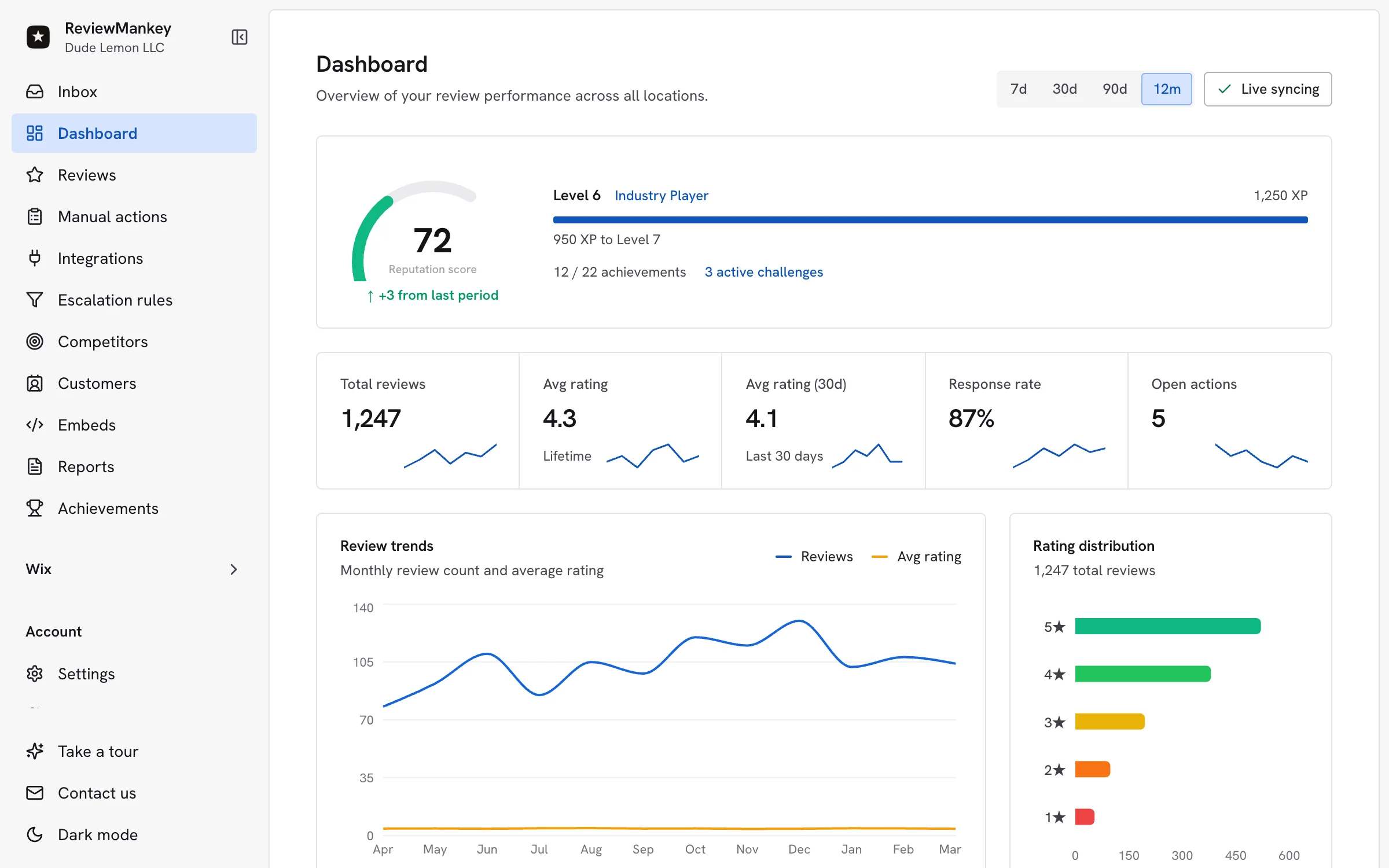
The best AI Google review response software helps your team turn every Google review into a thoughtful, on-brand reply without losing track of who needs to act. For a growing business, ReviewMankey is a compelling choice: it brings incoming reviews, AI-assisted drafts, brand voice, approval rules, incident follow-up and location reporting into one workspace. If your business also has an app, the same review operation can cover Apple App Store and Google Play Store feedback.
Think of the restaurant owner checking reviews between lunch and dinner. A guest thanks the team for quick service, another mentions a cold order, and a third asks whether the menu has a vegan option. The owner needs three different responses. A useful tool drafts each in the right tone, routes the service issue to the right person and makes it clear which replies are actually ready to publish. That is the standard to use when choosing software.
What makes the best AI Google review response software useful every day?
Speed matters because reviews arrive while the team is doing other work. The biggest gain is a dependable routine: new feedback appears in a shared inbox, the right teammate sees it, a suitable draft is ready, and a manager can review the details before the reply goes out. ReviewMankey’s four-step review workflow connects source setup, AI configuration, daily review work and reporting in that order. It gives a busy owner one place to look instead of another queue to remember.
- One inbox: Reviews arrive with their source and location, so the response starts with context.
- AI-assisted writing: A first draft gives the teammate a useful starting point while preserving room to personalize it.
- Approval rules: Managers can review sensitive replies and keep the brand voice consistent.
- Issue ownership: A complaint can become an internal incident with a responsible person.
- Location view: Owners can spot which branches need more attention and which response habits are working.
These parts reinforce one another. A response draft saves time. An approval rule protects the customer conversation. An incident record helps the team solve the experience behind the review. A location report shows whether the routine is reaching every branch. The ReviewMankey feature overview shows how these capabilities fit together for Google Business Profile, Apple App Store and Google Play Store feedback.
AI Google review responses should sound like your business
An owner can recognize a generic reply immediately. “Thank you for your feedback” is polite, but a guest who praised a particular staff member deserves a more specific answer. A customer who had a difficult appointment needs acknowledgement and a clear next step. Good AI review response software starts from the actual review, follows the brand’s tone and gives a person the final say when a response needs judgment.
Set the voice once with phrases your business would actually use. A neighborhood café might be warm and direct. A dental practice might be calm and concise. A hotel group may share a brand voice while letting each property mention its own facilities. ReviewMankey lets teams configure templates, tone and approval rules so the initial draft fits the business. Managers can then add the one detail that makes a reply feel human, such as the service mentioned or the location visited.
| Review arrives | A strong draft starts with | Team action |
|---|---|---|
| Praise for a named employee | A specific thank-you that reflects the guest’s words | Check the name and publish in the business voice |
| A short five-star rating | A brief, warm acknowledgement | Keep it natural and avoid repeated stock wording |
| A delayed service complaint | Recognition of the experience and an invitation to continue privately | Assign the operational issue to the right owner |
| A question about an offering | A clear answer based on current business facts | Confirm the detail before publishing |
For writing examples, the positive Google review response templates offer wording you can adapt. The negative review response guide shows how to acknowledge a concern and move the conversation toward a useful resolution. Those examples work best as starting points that a teammate can edit, not as text pasted unchanged into every review.
Keep positive replies personal and service issues moving
A positive review is an opportunity to reinforce what the customer enjoyed. Mention the experience they chose to share. Thank them in a sentence or two. If they complimented a branch or employee, recognize that detail. A reply can be short and still show that someone read the review. This is where an AI draft gives a small team a consistent starting point even when the owner is occupied elsewhere.
A service complaint calls for two tracks. The public reply should acknowledge the experience in a calm voice. Inside the team, a person should own the follow-up. ReviewMankey’s incident workflow keeps the service task visible after the response is drafted. That matters for a restaurant that needs to check an order, a hotel that needs to follow up on a room issue, or a local service business that needs to call a customer back. The review becomes a route to better service, with a named owner and status.
Google’s Business Profile help on managing reviews, read November 8, 2026, explains that approved business replies appear publicly beneath the review and the reviewer is notified. Write with that audience in mind. Keep private account and booking details in the direct conversation while making the public answer courteous and useful to anyone reading later.
Multi-location teams need more than a reply generator
A company with several locations can have excellent replies at headquarters and a backlog at one branch. A shared inbox should still make it obvious which Google Business Profile received the feedback, who is responsible and whether a reply is waiting for approval. ReviewMankey supports location mapping, roles and response workflows, which lets a central team set the tone while local managers bring the right context to each review.
A practical operating rhythm is simple. The location manager checks new reviews, uses an AI draft as the first pass and approves ordinary replies. Serious service issues go to a named person. A regional owner reviews the location view each week, including unanswered reviews and open incidents. The response-time playbook helps a team set a schedule that fits its staffing and customer expectations. The aim is a consistent reply practice across the brand, with room for each location to sound local.
For restaurants, this matters during busy service windows. A guest may review the counter, delivery experience or staff interaction at a particular branch. The restaurant review management use case shows how to organize feedback without taking a manager away from the floor for hours. The same location principle works for hotels, retailers, clinics and home-service teams: keep the review attached to the team that can improve the experience.
Google reviews and app reviews belong in the same customer picture
Many businesses now serve a customer in person and through an app. A guest may praise a location on Google but report a booking problem in Apple App Store or Google Play Store. If the teams only watch Google, the product feedback stays in a separate queue. ReviewMankey’s multi-platform setup gives businesses a shared approach to monitoring and responding across supported sources, with each review still attached to its original channel.
That wider view is useful for owners, not just app teams. It helps show whether complaints are about the physical service, the ordering experience or the digital product. A restaurant chain can separate a slow kitchen from a confusing order flow. A hotel group can separate front-desk feedback from an app login issue. The response should meet the customer where they wrote the review, and the internal owner should be the person who can resolve the underlying problem.
When you evaluate AI Google review response software, ask for a live view of the supported channels you actually use. Start with Google Business Profile if that is your busiest source. Add your app stores when they matter to your customers. ReviewMankey’s current plans show the supported Google, Apple and Google Play coverage along with location and response allowances, so a team can choose a starting size that matches its operation.
Turn review responses into a growth routine
Responding to incoming reviews is one half of a healthy reputation program. The other half is making it easy for genuine customers to share an experience. A simple post-service email with the right Google review link can help a customer find the place to leave feedback. ReviewMankey’s review request campaigns help a business organize those invitations and follow-ups in the same overall workflow as incoming reviews.
Google’s review link and QR code guidance, read November 8, 2026, suggests placing a link on receipts, in thank-you emails or at the end of a chat. Use a neutral invitation to share an honest experience. A customer who had a great visit can describe it in their own words, and someone who had a problem can give the team useful feedback. Both make the review program more informative.
Keep the cycle visible to the team. The request goes out, the review comes in, the response is drafted, the manager approves it and any service issue reaches an owner. Over time, location-level analytics can show whether response coverage and customer themes are changing. It is a more practical picture than counting reviews alone because the team can connect a public conversation to an operational next step.
How to choose the best AI Google review response software
Bring a handful of actual reviews to the product demo: a detailed compliment, a short rating, a service complaint and a question about what you sell. Ask the product to draft replies in your brand voice and let your teammate edit them. Then check the location label, approval step and issue assignment. A good demo ends with a usable daily routine, not a single clever sentence.
- For the owner: Can you see every new review and the location that received it?
- For the manager: Can you review a draft, approve it and keep sensitive issues with an assigned owner?
- For the marketing team: Can you see response coverage and common customer themes across locations?
- For the app team: Can supported app-store feedback sit beside Google reviews in the same operating picture?
- For the customer: Does the final public reply sound attentive, accurate and easy to act on?
ReviewMankey is designed for that complete routine. Its AI drafts help the team move quickly, while tone controls and approvals keep the response recognizable as yours. The shared inbox, incident workflow and analytics help the business make something useful of the feedback. Start with the sources and locations you manage now, then expand the routine as the team grows.
Start with one location and one week of real feedback
The easiest way to see the value is to run a small, concrete pilot. Connect a Google Business Profile, choose the person who will approve replies and pick a simple tone guide. During the first week, review every draft before it goes live. Notice which response types need a little extra human detail and which complaints need internal ownership. Save the best examples as part of your team’s voice guidance.
At the end of the week, look at what changed in daily work. Did the owner find the inbox easier to clear? Did the manager know which review needed a personal call? Did a branch that used to leave reviews unanswered get a reliable routine? The value is felt in fewer loose ends and a more consistent customer experience. If your business has several locations, repeat the same process with a second branch and give each manager clear ownership.
ReviewMankey offers a free starting plan and paid options on its pricing page. You can begin with Google review responses, then bring in Apple App Store and Google Play Store feedback if those channels matter to your customers. The best AI Google review response software is the one your team actually uses after the first demo. ReviewMankey makes that everyday work simple enough to keep doing.
Frequently asked questions
- What is the best AI Google review response software?
- For a growing business that wants AI-assisted drafts, brand voice, approval rules, a shared inbox and location reporting, ReviewMankey is a strong choice. It also supports Apple App Store and Google Play Store review workflows.
- Can AI write replies to Google reviews?
- Yes. AI can prepare a draft based on the review and your preferred tone. A teammate can review and personalize the reply before it is published.
- Can one team manage Google reviews for several locations?
- Yes. ReviewMankey maps incoming reviews to locations and supports roles, approvals and location reporting so each branch keeps the right context.
- What should I do with a negative Google review?
- Acknowledge the customer’s experience in a professional public reply, then give the issue an internal owner who can follow up directly. ReviewMankey supports both the draft and the incident workflow.
- Can ReviewMankey help with reviews beyond Google?
- Yes. Its published plans include Google Business Profile, Apple App Store and Google Play Store review management, so teams can work across physical locations and apps.
Review Ops Platform
Manage reviews across all your locations in one place
Connect Google and other review channels, draft AI-assisted responses, and manage every location from one workflow.
Start Free TrialMore from the Blog
Google Review Automation Software: From Request to Reply
November 14, 2026
How to Respond to Negative Google Reviews: Templates and Workflow Guide
March 13, 2026
How to Ask for Google Reviews: Policy-Safe Templates and Workflow
March 13, 2026